Aashiqui 2
    
VINOD
Showing posts sorted by relevance for query android. Sort by date Show all posts

Sunday, 2 June 2013

Simple Steps To Save Battery Power On Android Device


Android Operating System from Google is been in continuous effort to improve the Android App to save more battery power to give you long time performance with its wide offering features and functionality. However, there are many Android applications that are enabled by default and need to managed. There are few more settings, managing well can let you save lot of battery power.
# 1 Custom Power Settings and Power Settings Tips
Android Power Saving Tips
Don’t run around for power saving tips unless you go through, Power saving tips from Android itself.
Android Power Saving Tips in Detail
Go through every point, and learn which function can take what power consumption. Learning well can educate you to save better battery power.
# 2 Email preference
Email Check Frequency
You know, the android device is constantly waiting for input, when it found what it liked, shouted about it to you. That’s what happens when you have data pushed to your phone to alert you of new notifications. Turn it off by going to Email Settings> Data usage > Email Check Frequency. Change it to 30 minutes or an hour.
# 3 Adjust the Brightness 
Manage Brightness on Android device
Android device and tablets screens are so well designed that every detail is visible even with low screen brightness, manage it to save some battery power. Move the brightness slider to the level where your vision is comfortable.
How to Adjust the brightness on Android Phone
# 4 Screen mode and Auto-Rotate Screen
Manage Screen Mode on Android Device
# 5 Auto Adjust Screen Power
Auto Adjust the Screen Power on Android  device
Auto Adjust the Screen Power on Android device
Enable the Auto Adjust the Screen Power on Android will help you to save lot of battery power.
# 6 Screen Timeout
Set Screen Timeout on Android  device
Set Screen Timeout on Android device
Set Screen Timeout on Android device, you don’t need 10 minutes of time out if usage is frequent. Few seconds is good enough some time. It can also be managed based on what  application you want to use in current time.
# 7 Close unused Connectivity
I would recommend to close any unused connectivity. Turn off phone or tablet features that you don’t use, especially the following:
  • GPS
  • Wi-Fi
  • 4G/LTE and mobile network connection
  • Bluetooth
  • NFC
# 8 Clear Inactive and Background Process
Make a habit to clear unused/Inactive and background process once you are done with a day. This will clear all the unused process and even the background process.
Clear Inactive and Background Process
# 9 manage Location Service 
Manage Loction Services to Save batter and Data Power on Android Device
Manage Location Services to Save batter and Data Power on Android Device
Manage Location Services to Save batter and Data Power on Android Device, location services utilizes more battery power than any other Android App, as it continuously checks for location and other related data. Disable the services when not in use.
# 10 Manage Running and Unused Application on Android Device
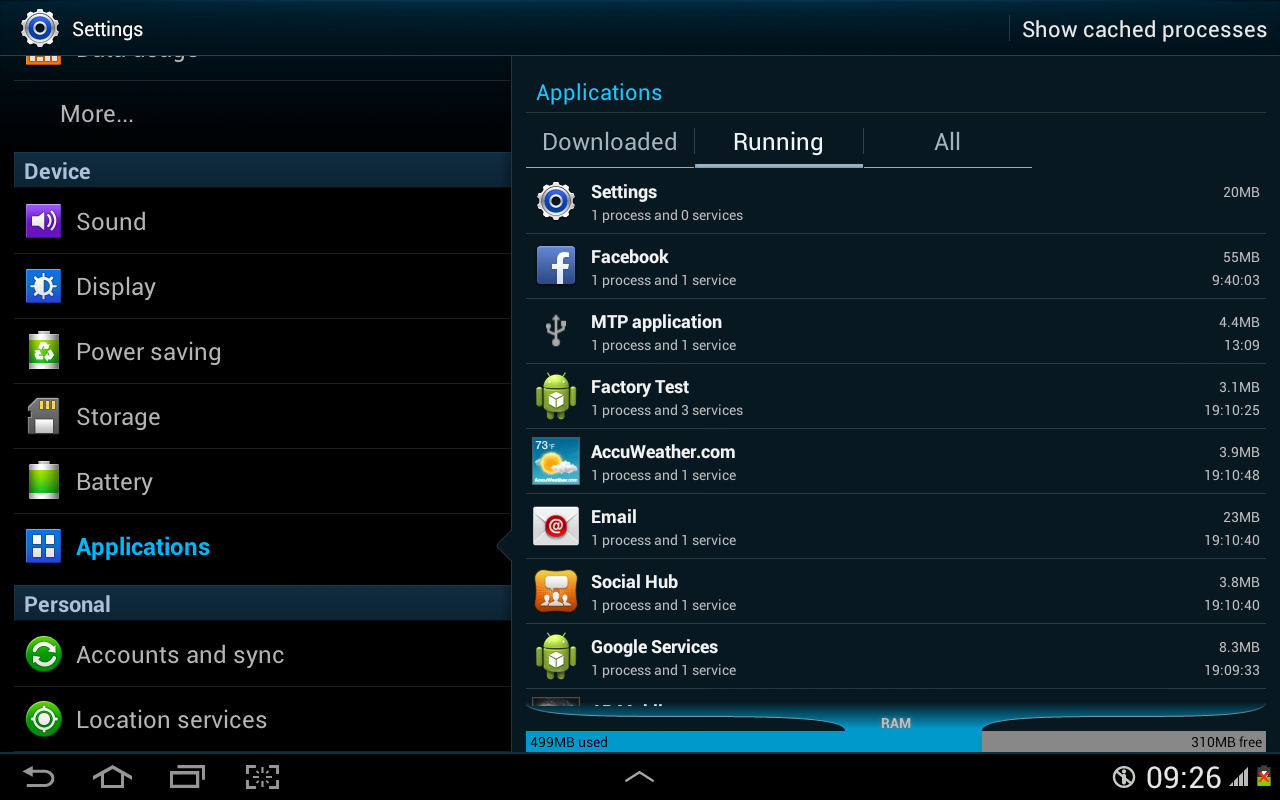
Manage Running and Unused Application on Android Device
Stop the services which you are not using currently.
In Settings, go to applications. This will show you all running applications with RAM usage. check above picture for more details
# 11 Monitor Battery Usage on Android Device
Monitor Battery Usage on Android Device
For monitor Battery Usage on Android Device, Go to Setting then Devices and click on Battery. Check the battery usage and get to know which app eating your battery. kill that app if you are not using it.
# 12 Automate  the Process
AutomateIt-Automate Your Droid
If you don’t want to manage battery power settings manualy, the good news is that there are several apps on the Google Play Store that you can use to automate, or semi-automate, the turning off of energy-draining features. Here are some that you can give it a try.
This free and ads-free app lets your device perform actions according to triggers that you associate them with. For instance, you can set it to disable certain features (e.g., Wi-Fi, Bluetooth, GPS, etc.) at certain hours of the day. Get the paid version for more flexibility with the triggers, actions, and rules.
This app, although having no free or trial version, is extremely flexible. It works in a similar way to AutomateIt. You can set your device to perform tasks/actions (e.g., disable network services) according to “contexts” that you specify (e.g., time of day, day of week, etc.). This app is not free.
This app is specifically written to help users lower battery consumption and squeeze more power out of their devices’ batteries. The default profile targets the most battery-sapping components (e.g., mobile data [3G/4G], Wi-Fi, and the like), but you can customize the settings further according to your needs.

Top 5 Android Web Browser, Choosing The Best Android Browser

The entire world is under Android Smartphones and Tablets which runs with huge number of apps and you do most of the stuff with internet. Since the internet is very important for your daily techie life, so as the browser which let’s you browse the entire World Wide Web. Android users are usually made a choice of browser app based on speed, interface, updates, features, easy settings and may be some other reasons.
I just hope you all Android users are using Android 2.2 and above. It’s a good idea to play with different browser to choose the best browser for Android which can save you monthly data allowance and process utilization. So, connect to the Wi-Fi or 3G to get started with the World’s best browser for Android.
Best Android Browser- UC Browser
UC browser allows it’s users to manage their browsing styles and create separate configurations for multiple network connections. It has more than 400 million users worldwide. Better UI Enhancement, watch Offline videos, customized Themes and Wallpapers, Incognito Browsing for your convenience and privacy and Intelligent blocking of advertisements.
Main Properties:
  • Multi-touch support for gestures and commands
  • Nice Download manager for faster downloads
  • Quick Reads is another option that you can enable to grab RSS feeds
  • Vox – control the app using voice
  • AutoFill will show suggestions as you type a word in the blank field
  • Night Mode can offer you a better browsing experience in a dark enviroment
  • Just 5.9 MB in size
  • Works with Android 2.1 and higher version
  • Multiple start screens with the ability to organize your Web apps into folders
  • Watch Offline videos by keeping it in favorite videos
  • Customized Themes and Wallpapers
  • Incognito Browsing best privacy, no browsing history will be recorded in this mode
  • Intelligent blocking of advertisements in WWW sites
Best Android Browser- Opera mini
One of the best Android browsers that suits your needs is Opera Mini that offers best speed, the faster a browser can load web pages, the better. In this respect, Opera Mini has every other browser licked. Its compression feature dramatically reduces the time taken to load pages. In some cases Opera Mini is about five times quicker than some of its rivals, so it’s worth trying out if your primary aim is to browse the web at lightning-fast speeds.Opera mini promises to give you fast and easy browsing that also saves your money.
Main Properties:
  • Opera Mini is about five times quicker than others
  • Speed Dial shows you all of your favorite websites at a glance
  • instant updates from your social networks
  • Latest news, entertainment, and sports.
  • Smart Page is your own personal window on the web
  • Tabs let you keep multiple pages open and switch between them
  • Reading online is better with page sizes, address bars and toolbars that adjust automatically
# 3 chrome
Best Android Browser- Chrome
The Google Chrome browser for Android is one of the most trusted applications not only on laptops but also on mobile devices and tablets. Over 100 million users have been downloading this application and it is the perfect companion app for your Android.You can enter your Google account details and sign it into your Desktop Chrome variant and then sing in into the mobile version and, every single thing will be automatically synced between both devices. Chrome for Android will not work with older Android phones and this might be a low-point.
Main Properties:
  • Fast and one of the most reliable Android web browsing tools
  • The desktop ‘incognito mode’ for safe browsing
  • Simple, intuitive experience
  • Open and quickly switch between an unlimited number of browser tabs
  • On your phone, flip through tabs the way you would fan a deck of cards
  • On your tablet, swipe from edge to edge to switch tabs
  • Search and navigate fast, directly from the same box
  • Choose from results that appear as you type in search
  • Browse faster with accelerated page loading, scrolling and zooming
Best Android Browser- Firefox
Firefox Browser for Android is the decade’s most popular desktop web browser is now available for Android devices. It packs all the features from the desktop variant and it can easily become your favorite browsing tool for when you’re playing with your phone or tablet. More than 50 million users worldwide have installed this application, which is a smoother alternative to Dolphin Browser. It has been released by Mozilla as a ‘fast, smart and safe’ application for all Android users who want to browse the world wide web from their smartphones.
Main Properties:
  • Highly customization as you can add Add-ons/ extensions
  • Awesome Screen functions that allows users to set favorite websites and an easy to use page
  • Awesome Bar is another great feature along with Sync functions
  • Sync function will bring all the bookmarks, history, passwords, bookmarks and opened tabs from your desktop Firefox browser and to your mobile Firefox app
  • Reader Mode will change the layout of web pages and offer you the possibility to read them much more easier
  • Access, browse, and search the web at blazing speeds
  • Make sure your Android web browser stays safe & private with extensive security settings, add-ons, and features like Do Not Track
  • Experience the unlimited possibilities of the mobile internet with support for HTML5 and Web APIs
  • Firefox’s Android browser is perfect for mobile video, and has mobile video support for a wide range of video formats including h.264
Best Android Browser- Dolphin
Dolphin Browser is famous for the fastest browsers ever released for Android devices featured with tabbed browsing along with Dolphin Connect. Dolphin Connect allows you to sync and send contents between your mobile and desktop browsers. More than 50 downloads and using Connect feature that allows you to send links, phone numbers, maps and almost any other files from your desktop to your smartphone using desktop browser extensions. You can sync history, passwords, bookmarks and open all the tabs that are currently running on all the other synced devices. The Wi-Fi Broadcast functions permits users to share links with their Dolphin friends using the nearby wi-fi connection. Also, Sonar is the ‘voice search’ function and you can simply say a word and Dolphin will proceed to give you related results.
Main Properties:
  • Add-ons that can be used to add extensions to your Dolphin Browser
  • Easy to configure favorite mobile web pages using the Speed Dial function
  • Weekly updates for Dolphin Android web browser
  • Dolphin Connect allows you to sync and send contents between your mobile and desktop browsers
  • sync history, passwords, bookmarks and open all the tabs that are currently running
  • Innovative Menu design with Infinite tabs browsing
  • Intelligent back & forward button
  • Powerful Copy Text (Select Text)
  • Multi-touch pinch zoom and RSS Detection

Tuesday, 11 June 2013

Best Free Antivirus For Android, Why Is Antivirus Required In Android?

Android operating system being the best platform for smartphones since past few years, it has to be secured with the best Antivirus from outside attacks, threat and hacks. In the past few months, more than 1 million Android users has been infected by serious virus threats due to not using correct Antivirus program.
Can my Android device get infected with virus?
NO
Android is the most secured operating system and runs every application within Sandbox security scheme. This is a technique that places “virtual walls” between apps and the rest of the device’s software, so that the only way an app can share resources and data is by declaring permissions which restrict what actions an app can perform on your Android device, what files it can reach, and whether it can get access to your personal info or not. Sandboxing limits the virus’ capacity to infect your device, as it cannot access data from the OS and other parts of the device without a specific user-granted permission. Few questions from your mind…
Why do I still need Antivirus in an Android device?
Yes
Even though Android cannot get infected with a virus because of Sandbox scheme but it doesn’t mean it is an impregnable OS. But if you think in a reverse way, its popularity has turned it into the crook’s favorite target around the globe, and with more than 700.000 Android apps available in the Play Store, it is reasonable to assume that there is plenty of potential malware and other security threats designed to take advantage of careless Android users. They can misguide you to do a mistake and attacks your device. There is a security measures for every application you run or install in Android device, I know so many people who don’t even care to set the permissions to that app and allows to do anything with full permission rights. Here is the Antivirus part comes to protect our careless or lazy work.
So here is the time to choose best Antivirus software for you Android smartphone. Android market, the Google Play store is full of Antivirus Apps to fight against spyware, malware, ad-ware and other threats. Let’s have a detailed look at the best Antivirus for Android smartphone.
Best Free Antivirus for Android- TrustGo
TrustGo Antivirus & Mobile Security is completely free Antivirus for Android smartphone, available in Android market. The perfect security scanner that let’s you scan on-demand or schedules to to remove any type of virus. It does also supports secure Web browsing to protect you from dodgy downloads and phishing scams.
Key Features:
  • Security Scanner – On-demand or scheduled scans of your mobile phone or tablet and SD card to find and remove viruses, malware, spyware and trojans PLUS risky apps that can steal your data.
  • Secure App Search – Our Secure App Finder Engine (SAFE) lets you search and download apps that you know are safe. TrustGo alerts you before downloading bad and risky apps.
  • Secure Web Browsing – Get an instant notification when a site you’re browsing is known to be malicious or part of a phishing scheme. Default Android Browser, Google Chrome and Dolphin Browser are supported.
  • System Manager – Monitor and manage your phone’s data usage, battery consumption and memory usage.
  • Privacy Guard – Easily identify apps that might be hurting your privacy with a smart dashboard showing all the permissions apps are using.
  • Data Backup – Store, backup and restore your phone’s data securely in the cloud. Supports multiple mobile devices so your family’s information is always safe.
  • Device Protection – Remotely locate your phone (Find My Phone), lock it, set off an alarm, or securely wipe your data and personal information if your phone is lost or stolen.
  • Candid Camera Thief ID – Lock your phone with TrustGo, and anyone who puts in the wrong password 3 times will have their picture taken through the front-facing camera and sent you vial email.
Best Free Antivirus for Android- Lookout
Lookout Security & Antivirus developed specially for Android is a completely free version and acclaimed to be one the best free Antivirus for Android smartphone.
Ability to locate a stolen Android device, gives you an option to locate the device through Lookout website, backup contacts online and restore them to existing or new device, all these features make it a best free Antivirus for Android smartphone.
Key Features:
  • Essential protection against all the viruses threats to your phone or tablet, like malware & viruses, loss, and theft.
  • Detect and remove viruses and spyware that can hide in apps, email attachments, or phone files.
  • Scans each number you dial from your mobile browser and it will alert you if dialing the number might have unintended consequences, like wiping your phone.
  • Schedule antivirus scans with weekly/daily options for constant virus protection.
  • Block dangerous URLs that can steal your private information like logins and passwords
  • Ability to locate a stolen Android device
  • An option to locate the stolen device through Lookout website
  • Backup contacts online and restore them to existing r new device
  • Sound a loud alarm or make your phone SCREAM to find it even if it’s on silent!
  • Protect your phone from prying eyes! Get an email with the picture and location of anyone who tries to unlock your Android device.
  • Wipe your phone’s data to rest assured that no one will have access to your info.
Best Free Antivirus for Android- avast
avast Free Mobile Security offers best protection with many additional tools in the package and the best of the bunch is the anti-theft component.
The anti-theft feature is hidden and allows you to remote control your smartphone using SMS. So if you lose your phone, you can remotely lock it, locate it, or wipe it. You can make it play a siren sound, lock down the SIM card, and prevent USB debugging as well. It’s a comprehensive solution for theft protection. If you have a rooted device then there’s also a firewall that allows you to control network traffic. You can block access to Wi-Fi or the network for specific apps which is handy for security and potentially saving on battery juice as well.
Key Features:
  • Ability to scans all running apps and external memory card content on schedule and demand.
  • Scans and displays access rights and intents of installed apps.
  • Remote control your device via SMS or Web (cell phone tracking, activate siren, memory wipe, etc.).
  • Measures incoming/outgoing data transfers.
  • Scans each URL that loads and warns you if it’s malware-infected. Includes USSD blocker.
  • Gives you control of the app from your Android desktop.
  • Provides remote control of anti-theft features (cell phone lock, GPS tracking, memory wipe, etc.).
  • Automatically fixes mistyped URLs.
  • Advanced settings for app, web, and messages scanning.
  • Lists apps and their sizes (MB), CPU load, memory used, etc.
  • Runs only when performing tasks to save battery
  • Monitors network traffic
Best Free Antivirus for Android- AVG

Avg Antivirus has been proved to be the one of the best free antivirus for Android smartphone. All the required features such as Malware Protection, Backup assistant, Av real-time Scanner, task killer etc works best.
Key Features:
  • Apps Scaning, settings, files, and media in real time
  • Easy to locate your lost or stolen phone via Google Maps
  • Lock/wipe your device to protect your privacy
  • End or Kill tasks that slower down the device
  • Web shield that scans URLs for malware
  • Let’s you browse the Web safely and securely
  • Enabled with battery monitor, storage and data package usage
  • Quick & easy protection for your device
Best Free Antivirus for Android- Dr.Web

Dr.Web for Android Light offers best protection from viruses such as spyware, malware, ad-ware to protect your mobile device.
Key Features:
  • Quick or full file system scanning, as well as custom scanning of files and folders specified by the user.
  • Real-time file system scanning with SpIDer Guard monitor whenever attempts are made to save files to the device’s memory.
  • Detects new, unknown malware using the unique Origins Tracing™ technology.
  • Protects the SD card from becoming infected with autorun and Exploit.Cpllnk files, which can be dangerous for devices running Windows.
  • A quarantine to which detected threats can be moved and from which files can be restored.
  • Minimal impact on OS performance.
  • Careful use of battery resources.
  • Small-sized virus database updates to save traffic, which is especially important for users with limited mobile phone plans.
  • Statistics on detected threats and actions performed.
  • Handy and informative desktop widgets to access the application.